Active Alerts (Analyzer)
The Alerts panel provides the ability to view all sites, and the terminal name, that recorded an alert for the selected criteria. Users can customize the alerts, so they don't need to view all alerts or filter the alerts list each time they log in.
Note: Once an alert is resolved, it moves to historical data reporting.
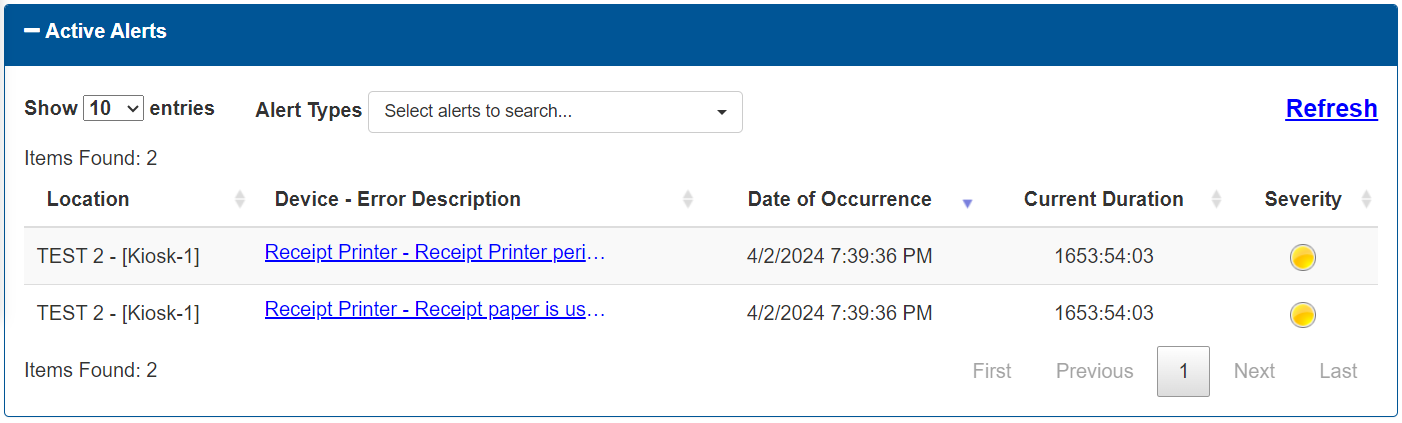
Show 10 entries
The Show 10 entries function provides the ability to set the maximum number of alerts to display on each page in the Alerts panel. If the number of alerts exceeds this number, page navigation functions are enabled at the bottom of the panel.
This function is set to 10 by default.
Alert Types
The Alert Types function provides the ability to specify the category of alerts to view in the Alerts panel.
- Cash Devices
- Credit Devices
- Kiosk System
- Other Alerts
- Other Devices
- Wash Equipment
Refresh
The Refresh function provides the ability to check and update the list with any alert notifications recorded since it opened.
Alerts List
The alert notification data is organized in a table.
Items Found
The Items Found value provides the total number of alert notifications in the list.
Location
The Device - Error Description column provides the name of the terminal that generated the alert.
Device - Error Description
The Device - Error Description column provides the peripheral and alert notification text, formatted as a link.
Date of Occurrence
The Date of Occurrence column provides the date and time the alert was generated.
The format is displayed as MM/DD/YYYY HH:MM:SS AM/PM.
Current Duration
The Current Duration column provides the length of time the corresponding alert has been active.
The format is recorded and displayed as HOURS:MINUTES:SECONDS.
Severity
The Severity column provides the urgency of the corresponding alert using color-coding.
Orange
Orange indicates the corresponding alert is a minor error that has been fixed.
Red
Red indicates the corresponding alert is for a peripheral or device that is down and requires immediate attention.
Page Navigation Functions
Page navigation functions are enabled at the bottom of the panel if the number of alerts exceeds the configured maximum number. The functions are visible, but disabled if the number of alerts does not exceed the maximum number.
First
The First function advances the alerts list to page 1.
Previous
The Previous function advances the alerts list to the prior page. It is disabled when the first page is open.
Page Number
The Page Number function advances the alerts list to the specific, user-entered page.
Next
The Next function advances the alerts list to the following page. It is disabled if no additional page is available.
Last
The Last function advances the alerts list to the final page.
Updated: 042726