Watcher (Analyzer)
The Watcher panel provides a summary of site revenue for site groups and time frame. This report can be exported to a PDF or Excel XLSX file.
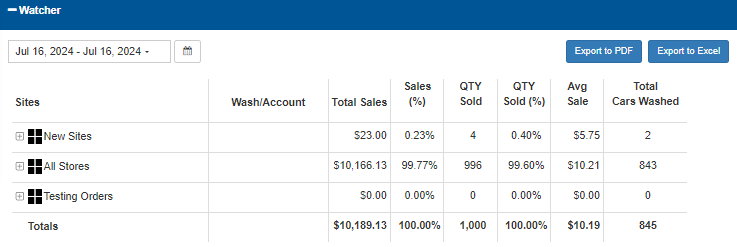 :
:
Date Selector
The Date Selector provides the ability to specify the time frame for which to view sales data:
- Today
- Yesterday
- This Week
- Last Week
- This Month
- Last Month
- Quarterly
- Last Quarterly
- Half Year
- Last Half Year
- This Year
- Last Year
Calendar Selector
The Calendar Selector provides the ability, in addition to the Date Selector options, to specify the date for which to view sales data.
Export to PDF
Select the Export to PDF function to generate and download a PDF file that contains the current Watcher data.
Export to Excel
Select the Export to Excel function to generate and download an XLSX file that contains the current Watcher data.
Sales Data
The Watcher sales data, based on the selected date, is provided in a table organized by sites/groups. The data includes wash/account, total sales amount, sales percentage, quantity sold, quantity sold percentage, average sale, and total cars washed.
Sites
The Sites column lists all sites, organized by group. Each group can be expanded to view the sites, and corresponding site data, that belong to the group.
Wash/Account
The Wash/Account column provides the type of wash or type of account for the corresponding site.
Note: Nothing appears in this column for groups.
Total Sales
The Total Sales column provides the total sales amount recorded for each corresponding site or group, for the selected date.
Sales (%)
The Sales (%) column provides the percentage of all sales that each corresponding site or group accounts for, relative to all sites/groups, for the selected date.
Note: The Totals value for this column (at the bottom of the table) is always 100%.
QTY Sold
The QTY Sold column provides the total number of products sold for the corresponding site or group accounts, for the selected time frame,
QTY Sold (%)
The QTY Sold (%) column provides the percentage of the total quantity of all products sold that the corresponding site or group accounts for relative to all sites/groups, for the selected date.
Note: The Totals value for this column (at the bottom of the table) is always 100%.
Avg Sale
The Avg Sale column provides the average dollar amount recorded for each sale, for the selected time frame,
Total Cars Washed
The Total Cars Washed column provides the number of cars washed for the corresponding site or group, for the selected time frame.
Totals
The Totals row at the bottom of the table provides a total for each column:
- Total Sales
- Sales (%)
- QTY Sold
- QTY Sold (%)
- Avg Sale
- Total Cars Washed
Updated: 042726