Payments Report (Reporter)
The Payments Report lists the type of payments received for wash and code transactions. It is organized into transactions sold at the kiosk, POS codes, and Accounts, plus displays Underpayments. There are two different payment report types: a detailed report, Payments - Details Report, and a summarized report, Payments Report.
Export to PDF
The Export to PDF function generates and downloads a PDF file that contains the current Payments Report data.
Export to Excel
The Export to Excel function generates and downloads an XLSX file that contains the current Payments Report data.
Date Range
The Date Selector provides the ability to specify the time frame for which to view payments data:
- Today
- Yesterday
- This Week
- Last Week
- This Month
- Last Month
- Quarterly
- Last Quarterly
- Half Year
- Last Half Year
- This Year
- Last Year
Calendar Selector
The Calendar Selector provides the ability, in addition to the Date Selector options, to specify the date for which to view payments data.
Created
The Created date provides the month, day, year, and time (hour, minutes, and seconds) the report was generated.
Payments Report (Summary)
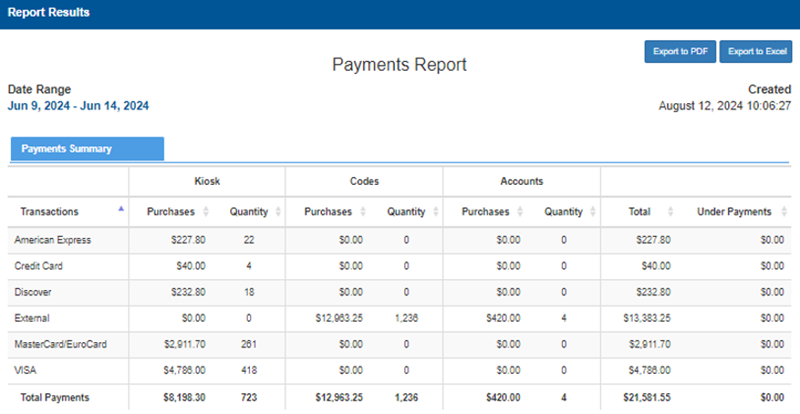
The summarized Payments Report provides purchase and quantity information for each point-of-sale, grouped by payment method (for example, VISA, American Express, Cash).
Transactions
The Transactions column provides the payment type or transaction category for the row (for example, American Express, VISA, MasterCard/EuroCard, Discover, Credit Card, External). Each row represents totals for that payment method across the report period.
Kiosk
Two Kiosk columns are provided in the table: Purchases and Quantity.
Purchases
The Purchases (Kiosk) column provides the dollar amount of sales processed at the self-service kiosk for the given payment type (currency value of kiosk purchases).
Quantity
The Quantity (Kiosk) column provides the number of individual transactions processed at the kiosk for the given payment type (count of kiosk purchases).
Codes
Two Codes columns are provided in the table: Purchases and Quantity.
Purchases
The Purchases (Codes) column provides the dollar amount of transactions processed using codes (redemptions or POS-entered codes) for the given payment type during the reporting period.
Quantity
The Quantity (Codes) column provides the count of code-based transactions (number of purchases recorded using redemption or POS codes) for the payment type.
Accounts
Two Accounts columns are provided in the table: Purchases and Quantity.
Purchases
The Purchases (Accounts) column provides the dollar amount charged to accounts (house accounts or pre-authorized account redemptions) for the payment type during the reporting period.
Quantity
The Quantity (Accounts) column provides the number of account redemptions recorded for that payment type (count of transactions applied to accounts).
Total
The Total column provides the combined dollar total for the row, aggregating purchases across Kiosk, Codes, and Accounts for the given payment type - the overall revenue amount attributed to that payment method.
Under Payments
The Under Payments column provides any shortfalls or underpayments associated with the transactions for that payment type (currency value). This shows amounts that were not fully paid or reconciled for the row.
Total Payments (Bottom Row)
The Total Payments row, located at the bottom of the table, aggregates the report: summed Purchases and summed Quantity for each channel (Kiosk, Codes, Accounts), the overall Total revenue across all payment types, and the combined Under Payments. This row represents the full-period totals shown in the table.
Payments - Details Report
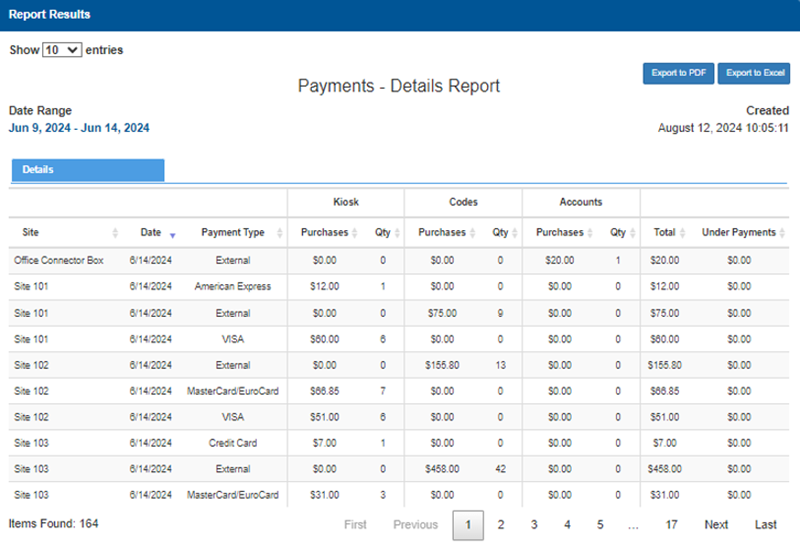
The detailed Payments - Details Report provides purchase and quantity information for each point-of-sale, for each site and date.
Site
The Site column provides the location or terminal where the transaction occurred (for example, a site name or identifier such as "Site 101" or "Office Connector Box"). Each row represents activity for that site and date.
Date
The Date column provides the date on which the transaction or activity was recorded, shown in a standard date format (for example, MM/DD/YYYY).
Payment Type
The Payment Type column provides the payment method or card type used for the transaction (for example, External, VISA, MasterCard/EuroCard, Credit Card, American Express). This identifies how the customer paid or how the sale was processed.
Kiosk
Purchases
The Purchases (Kiosk) column provides the total dollar amount of transactions processed at the self-service kiosk for the given row (currency value of kiosk sales).
Qty
The Qty (Kiosk) column provides the number of kiosk transactions (count of purchases) recorded at the kiosk for that site/date.
Codes
Purchases
The Purchases (Codes) column provides the total dollar amount of transactions processed using codes (sales recorded under code redemptions or POS codes) for the row.
Qty
The Qty (Codes) column provides the number of code-based transactions (count) processed for the site/date.
Accounts
Purchases
The Purchases (Accounts) column provides the total dollar amount charged to accounts (house or account redemptions) for that row.
Qty
The Qty (Accounts) column provides the count of account redemptions (number of transactions applied to accounts) for the site/date.
Total
The Total column provides the combined dollar total for the row aggregating purchases across kiosk, codes, and accounts - the overall revenue amount for that site/date and payment type.
Under Payments
The Under Payments column provides any outstanding shortfalls or underpayments associated with the transactions for the row (currency value), showing amounts that were not fully paid or reconciled.
Updated: 042726