Account Program (Accounts)
The Account Programs panel provides the ability to create account program templates for a loyalty and/or prepaid programs. Account program template configuration options include the ability to configure whether a receipt should be printed, the value charged when sold, the value issued, applicability/eligibility, wash applicability/eligibility, usage limits/frequency, and/or days and times it can be used.
See also: Create an Account Program Template
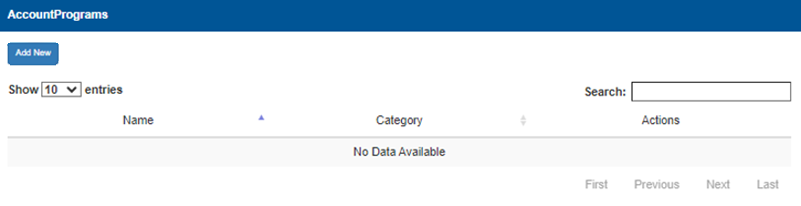
Add New
The Add New function provides the ability to create and configure a new account template. It opens a dialog to configure whether a receipt should be printed, the value charged when sold, the value issued, applicability/eligibility, wash applicability/eligibility, usage limits/frequency, and/or days and times it can be used.
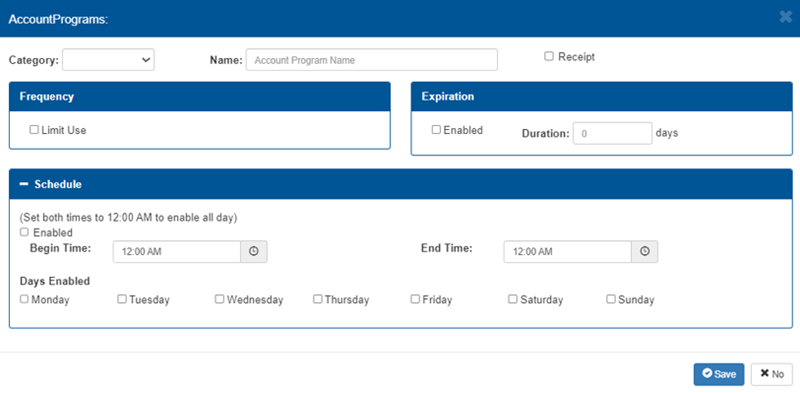
Category
The Category setting provides the ability to specify the type of account program template, for example, Pre-paid.
Name
The Name setting provides the ability to specify an text identifier for this account program template.
Receipt
The Receipt setting prints a receipt for customers when selected.
Frequency
The Frequency section provides a Limit Use setting to control usage of this account program.
Expiration
The Expiration section provides the ability to enable and then set the length of time (in days) the account program is available.
Schedule
The Schedule section provides the ability to specify the days of the week, as well as the time range for those days, the account program template is active.
Important: To enable the account program for the entire day, set Begin Time to 12:00 AM.and End Time to 12:00 AM.
Account Programs List
The account programs list provides basic information about the existing account program templates, including name, category, and actions.
Show 10 entries
The Show 10 entries function provides the ability to specify the number of account program templates to list per page. If the number of account program templates exceeds this number, page navigation functions are enabled to advance through the additional pages.
Search
The Search function provides the ability to locate an account program template, or templates, in the list.
Name
The Name column provides the name associated with the account program template, for example, $25 Gift Card.
Category
The Category column provides group of the account program template, for example, Pre-paid.
Actions
The Actions column provides functions to edit or delete the corresponding account program template.
Page Navigation
Page navigation functions are enabled at the bottom of the panel if the number of accounts exceeds the configured maximum number. The functions are visible, but disabled if the number of accounts does not exceed the maximum number.
First
The First function advances the accounts list to page 1.
Previous
The Previous function advances the accounts list to the prior page. It is disabled when the first page is open.
Page Number
The Page Number function advances the accounts list to the specific, user-entered page.
Next
The Next function advances the accounts list to the following page. It is disabled if no additional page is available.
Last
The Last function advances the accounts list to the final page.
Updated: 042726