Media Package Importer (Marketing)
The Media Package Importer provides the ability to replace existing customer-facing video files for use at the X-Start kiosk terminal. After new media files are imported, they must be scheduled as an update for the kiosk terminal using the Scheduled Tasks tool. Note that importing video files requires the kiosk terminal to already have a video configured for the kiosk terminal. For more information, contact the DirectorX team at DirectorSupport@DRB.com.
Note: See "Import a Media Package" for steps to import a new media package.
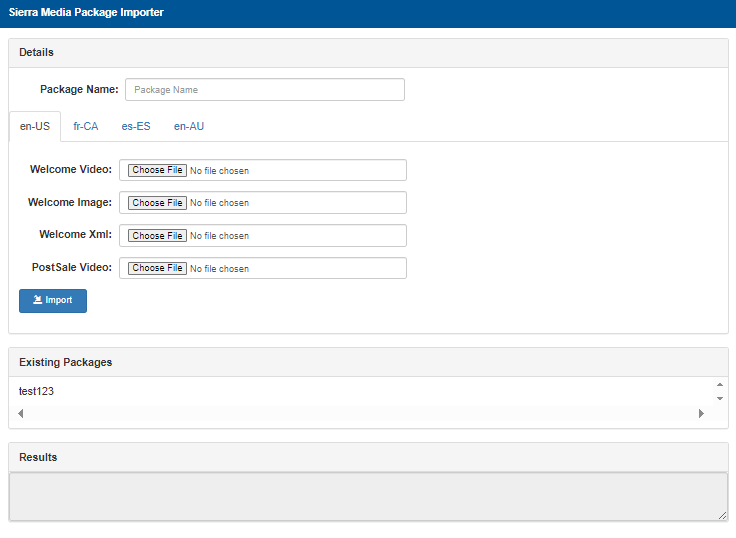
Details
The Details section provides the ability to import media packages for use with the X-Start kiosk terminal.
Package Name
The Package Name field provide the ability to assign a name to a media package that is being imported. After the media package is imported, this name will appear in the Existing Packages section located below the Details section.
en-US (Language)
Language tabs are available to select and import media files for four (4) different languages.
- en-US: Contains English language settings for customers in the U.S.
- fr-CA: Contains French language settings for customers in Canada.
- es-ES: Contains Spanish language settings for customer in Spain.
- en-AU: Contains English language settings for customers in Australia.
Welcome Video
The Welcome Video field provides the ability to select a video file to upload and use as the video that plays when a customer first arrives at the kiosk terminal.
Choose File
The Choose File function opens a file selection dialog to select the video file.
Welcome Image
The Welcome Image field provides the ability to select an image file to upload and use as the image that plays when a customer first arrives at the kiosk terminal.
Choose File
The Choose File function opens a file selection dialog to select the image file.
Welcome Xml
The Welcome Xml field provides the ability to select an XML file to upload and use when a customer first arrives at the kiosk terminal.
Choose File
The Choose File function opens a file selection dialog to select the XML file.
PostSale Video
The PostSale Video field provides the ability to select a video file to upload and use as the video that plays at the conclusion of a customer's transaction at the kiosk terminal.
Choose File
The Choose File function opens a file selection dialog to select the video file.
Import
The Import function uploads any file(s) selected in the language fields:
- Welcome Video
- Welcome Image
- Welcome Xml
- PostSale Video
Existing Packages
The Existing Packages section lists all previously imported media packages.
Results
The Results section provides confirmation after media files are imported.
Updated: 042726