Role Manager (Admin)
The Role Manager panel provides the ability to configure and edit employee user roles. A role is a group that can be configured to control employee access/permissions in DirectorX. DRB creates and adds the main Corporate Admin role for a site when DirectorX is installed. This role provides users the ability to add and edit roles in the system as necessary. Users are configured and edited in the User Manager panel. See "Add a New Role" in the DirectorX User Manual for steps to add a new role. Note that only one role should be assigned to a user; assigning multiple roles can create conflicts for the user.
Warning: Some permissions include the ability to provide free and discounted washes, and/or free or discounted accounts.
Add New
The Add New function creates a new user role, which can then be configured and assigned to users.
Roles List
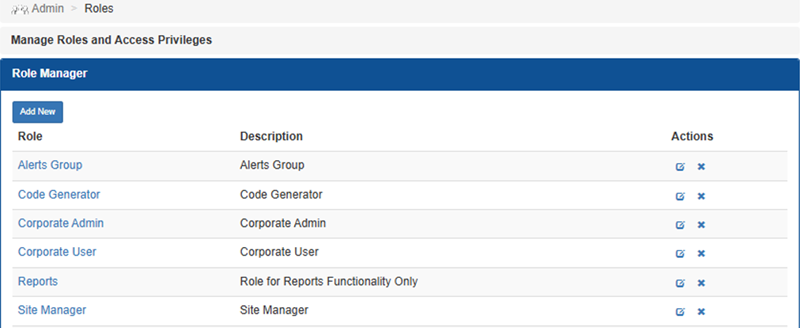
The Roles List provides all configured roles for a site, organized in a table format.
Role
The Role column provides the name of the role, formatted as a link that can be selected to open the configuration for the corresponding role.
Description
The Description column provides a short string of text to help identify the user role's permissions level.
Actions
The Actions column provides an Edit function and a Delete function, for each role.
Edit
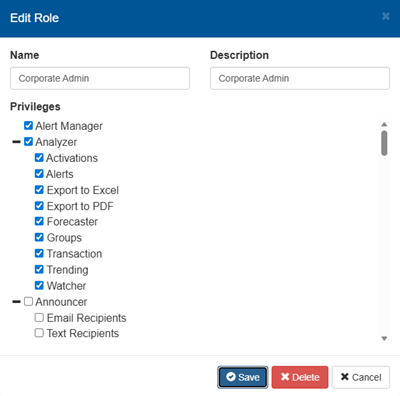
The Edit function opens the Edit Role dialog, which provides access to the corresponding user role's settings.
Delete
The Delete function deletes the corresponding existing user role. Selecting the function opens a confirmation dialog that requires the user to confirm the deletion before it is deleted.
Important: A user role can't be deleted if it is assigned to at least one user.
Updated:: 042726