User Manager (Admin)
A user is an individual at an organization that has some assigned permission(s) in DirectorX. DRB creates and adds a main administrative user for a site when the DirectorX system is installed. That user can then add and edit users in their system as necessary.
See Add a New User in the DirectorX User Manual for steps to add a new user.
Add New
The Add New function creates a new user, which can then be configured.
Users List
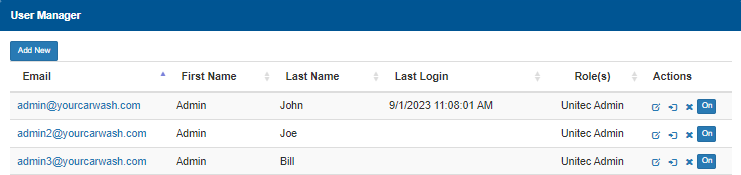
The Users List provides a list of all configured users, with basic information for each, organized in a table format.
The Email column provides the email address of the user, formatted as a link.
First Name
The First Name column provides the first name of the user.
Last Name
The Last Name column provides the last name of the user.
Last Login
The Last Login column provides the date and time the corresponding user most recently logged in to the DirectorX application.
The time and date format is MM/DD/YYYY HH:MM:SS AM/PM.
Role(s)
The Role(s) column identifies the user role(s) to which the corresponding user belongs.
Actions
The Actions column provides an Edit function, Duplicate function, Delete function, and On function for each user.
Edit
The Edit function provides the ability to edit the configuration for the corresponding existing user.
Duplicate
The Duplicate function creates a new user, based on the corresponding existing user.
Delete
The Delete function deletes the corresponding existing user. Selecting the function opens a confirmation dialog that requires the user to confirm the deletion before it is deleted.
On/Off
The On/Off function controls whether the user is enabled or disabled.
Updated:: 042726