Accounting Report (Reporter)
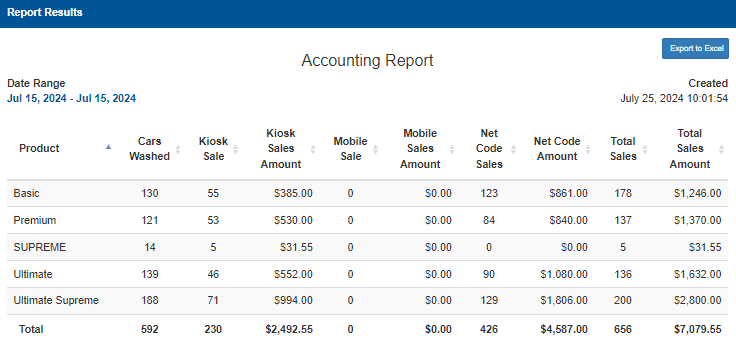
The Accounting Report provides information on product sales.
Important: This report can be automatically generated and sent to email recipients in the Scheduled Tasks (Tools) panel.
Date Range
The Date Selector provides the ability to specify the time frame for which to view accounting data:
- Today
- Yesterday
- This Week
- Last Week
- This Month
- Last Month
- Quarterly
- Last Quarterly
- Half Year
- Last Half Year
- This Year
- Last Year
Calendar Selector
The Calendar Selector provides the ability, in addition to the Date Selector options, to specify the date for which to view accounting data.
Export to Excel
Select the Export to Excel function to generate and download an XLSX file that contains the current Accounting Report data.
Created
The Created date provides the month, day, year, and time (hour, minutes, and seconds) the report was generated.
Report Data
The Accounting Report data is listed in a table format, with the following information for each product: cars washed, number of sales at a kiosk, total sales amount at a kiosk, number of mobile sales, total mobile sales amount, number of net sales, total net sales amount, and then the sum number of sales and sum total sales amount.
Product
The Product column provides the name of the wash product or service that was sold.
Cars Washed
The Cars Washed column provides the number of the corresponding wash product that was sold.
Kiosk Sale
The Kiosk Sale column provides the number of the corresponding wash product that was purchased at a kiosk terminal.
Kiosk Sales Amount
The Kiosk Sales Amount column provides the total dollar amount of the corresponding wash product that was purchased at a kiosk terminal.
Mobile Sale
The Mobile Sale column provides the number of the corresponding wash product that was purchased at a mobile device.
Mobile Sales Amount
The Mobile Sales Amount column provides the total dollar amount of the corresponding wash product that was purchased at a mobile device.
Net Code Sales
The Net Code Sales column provides the number of the corresponding wash product that was purchased via code.
Net Code Amount
The Net Code Amount column provides the total dollar amount of the corresponding wash product that was purchased via code.
Total Sales
The Total Sales column provides the sum of the corresponding wash product that was purchased at a kiosk terminal, mobile device, and net code.
Total Sales Amount
The Total Sales Amount column provides the sum of the total dollar amount of the corresponding wash product that was purchased at a kiosk terminal, mobile device, and netcode.
Total (Bottom Row)
The Total row provides the sum of each column.
Updated: 042726