Revenue Report (Reporter)
The Revenue Report provides revenue details, sorted by three different revenue reports: summary sales, summary redemptions, and details. Reports can be exported to PDF and Excel.
Important: This report can be automatically generated and sent to email recipients in the Scheduled Tasks (Tools) panel.
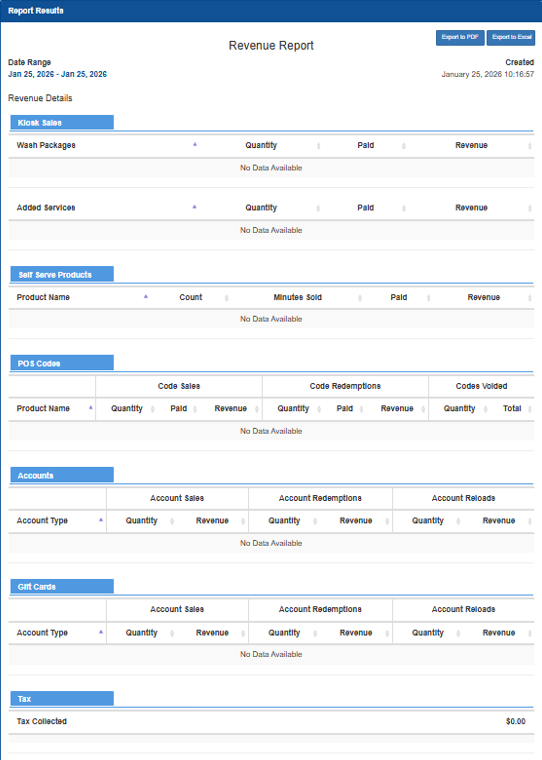
Report Components
The Revenue Report provides tools to select a time period for which to generate the report, export a generated report to PDF or Excel, and view the date and time the displayed report was generated.
Export to PDF
The Export to PDF function generates and downloads a PDF file that contains the current Revenue Report data.
Export to Excel
The Export to Excel function generates and downloads an XLSX file that contains the current Revenue Report data.
Date Range
The Date Selector provides the ability to specify the time frame for which to view revenue data:
- Today
- Yesterday
- This Week
- Last Week
- This Month
- Last Month
- Quarterly
- Last Quarterly
- Half Year
- Last Half Year
- This Year
- Last Year
Calendar Selector
The Calendar Selector provides the ability, in addition to the Date Selector options, to specify the date for which to view payments data.
Created
The Created date provides the month, day, year, and time (hour, minutes, and seconds) the report was generated.
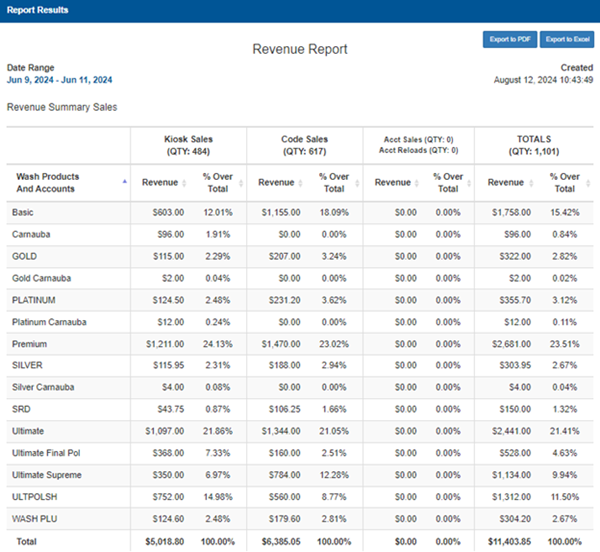
Revenue Summary Sales
The Revenue Summary Sales section provides revenue and percentage data for wash product/account sales, organized by kiosk sales, code redemptions, and account redemptions.
Wash Products And Accounts
The Wash Product And Accounts column provides the type of wash or type of account for which sales activity was recorded, for the generated report's time range.
Kiosk Sales (QTY)
The Kiosk Sales (QTY) columns provide the total number of kiosk sales, revenue received for each wash product or account, and percentage of kiosk sales that each wash product or account accounted for, compared to all other wash products/accounts sold at the kiosk terminal(s).
Revenue
The Revenue column provides the total revenue received for each wash product or account, from sales at the kiosk terminal(s).
% Over Total
The % Over Total column provides the percentage (compared to all kiosk sales) that each wash product or account accounts for.
Code Sales (QTY)
The Code Sales (QTY) columns provide the total number of wash codes sold, revenue received for each wash product or account sold as a wash code, and the percentage of wash codes sales that each wash product or account accounted for, compared to all other wash products/accounts sold at other point-of-sale terminal(s).
Revenue
The Revenue column provides the total code revenue received for each wash product or account, from sales at other point-of-sale terminal(s).
% Over Total
The % Over Total column provides the percentage (compared to all code sales) that each wash product or account accounts for.
Acct Sales (QTY) | Acct Reloads (QTY)
The Acct Sales (QTY) | Acct Reloads (QTY) columns provide the total number of accounts sold, total number of accounts reloaded, revenue received for each account sale or reload, and the percentage of account sales or reloads that each wash product or account accounted for, compared to all other wash products/accounts sold.
Revenue
The Revenue column provides the total account sales and account reloads revenue received for each wash product or account, from sales.
% Over Total
The % Over Total column provides the percentage (compared to all account sales and account reloads) that each wash product or account accounts for.
TOTALS (QTY)
The TOTALS (QTY) columns provide the total revenue from kiosk sales, code sales, account sales, and account reloads, as well as the percentage that each wash product or account accounted for.
Revenue
The Revenue column provides the total revenue from kiosk sales, code sales, account sales, and account reloads.
% Over Total
The % Over Total column provides the percentage (compared to all account sales and account reloads) that each wash product or account accounts for.
Total (Bottom Row)
The Total row at the bottom of the POS Codes section provides totals for each column: total kiosk sales revenue amount, total codes sales revenue amount, total account sales and reload revenue amount, and total sales revenue.
Note: Each % Over Total column is 100%.
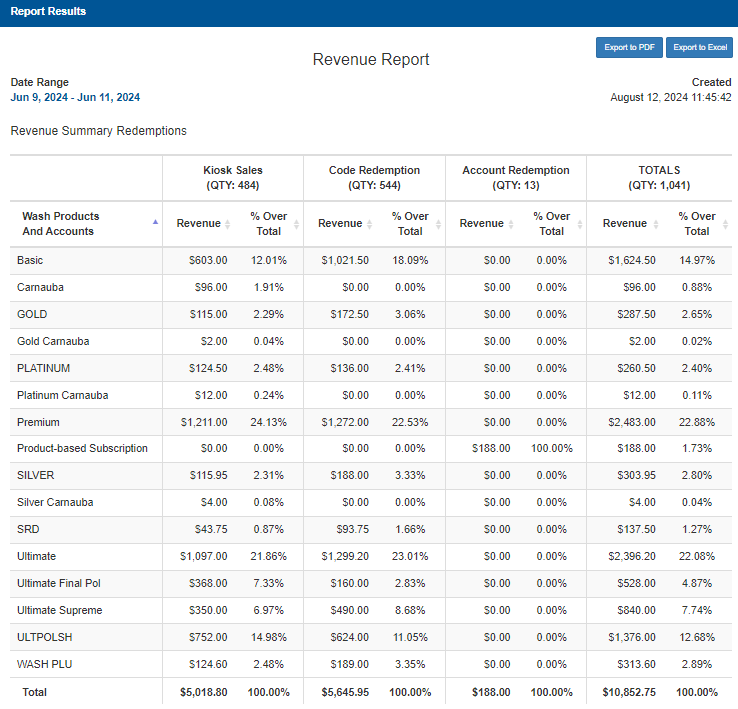
Revenue Summary Redemptions
The Revenue Summary Redemptions section provides revenue and percentage data for wash product/account redemptions, organized by kiosk sales, code redemptions, and account redemptions.
Wash Product And Accounts
The Wash Product And Accounts column provides the type of wash or type of account for the corresponding site.
Kiosk Sales (QTY)
The Kiosk Sales (QTY) column provides the number of sales at the kiosk terminal(s), revenue amount for each product sold at the kiosk terminal(s), and the percentage each wash product/account represents for all kiosk terminal sales.
Revenue
The Revenue column provides the total sales amount recorded for each corresponding product/account sold at the kiosk terminal(s), for the selected date.
% Over Total
The % Over Total column provides the percentage each wash product/account represents for all kiosk terminal sales, for the selected date.
Note: The Total value for this column (at the bottom of the table) is always 100%.
Code Redemption (QTY)
The Code Redemption (QTY) column provides the number of codes redeemed, revenue amount for each product/account code redeemed, and the percentage each wash product/account the code redemption represents for all code redemptions.
Revenue
The Revenue column provides the total sales amount recorded for each corresponding product/account code redeemed, for the selected date.
% Over Total
The % Over Total column provides the percentage each product/account code redemption represents, for the selected date.
Note: The Total value for this column (at the bottom of the table) is always 100%.
Account Redemption (QTY)
The Account Redemption (QTY) column provides the number of accounts redeemed, revenue amount for each product/account account redeemed, and the percentage each wash product/account the account redemption represents for all account redemptions.
Revenue
The Revenue column provides the total sales amount recorded for each corresponding product/account account redeemed, for the selected date.
% Over Total
The % Over Total column provides the percentage each product/account account redemption represents, for the selected date.
Note: The Total value for this column (at the bottom of the table) is always 100%.
TOTALS (QTY)
The TOTALS (QTY) column provides the sum of the Kiosk Sales (QTY) quantity, Code Redemption (QTY) quantity, and Account Redemption (QTY) quantity; the sum of Kiosk Sales revenue, Code Redemption revenue, and Account Redemption revenue; and overall percentage that each product/account (for Kiosk Sales, Code Redemption, and Account Redemption) represents for the site(s).
Revenue
The Revenue column provides the sum of Kiosk Sales revenue, Code Redemption revenue, and Account Redemption revenue.
% Over Total
The % Over Total column provides the overall percentage that each product/account (for Kiosk Sales, Code Redemption, and Account Redemption) represents for the site(s).
Note: The Total value for this column (at the bottom of the table) is always 100%.
Total (Bottom Row)
The Total row at the bottom of the table provides a total for each column:
- Kiosk Sales: Revenue
- Kiosk Sales: % Over Total
- Code Redemption: Revenue
- Code Redemption: % Over Total
- Account Redemption: Revenue
- Account Redemption: % Over Total
- TOTALS: Revenue
- TOTALS: % Over Total
Revenue Details
The Revenue Details section provides quantity and revenue amounts for kiosk sales, point-of-sale code sales, account sales, gift card sales, and tax.
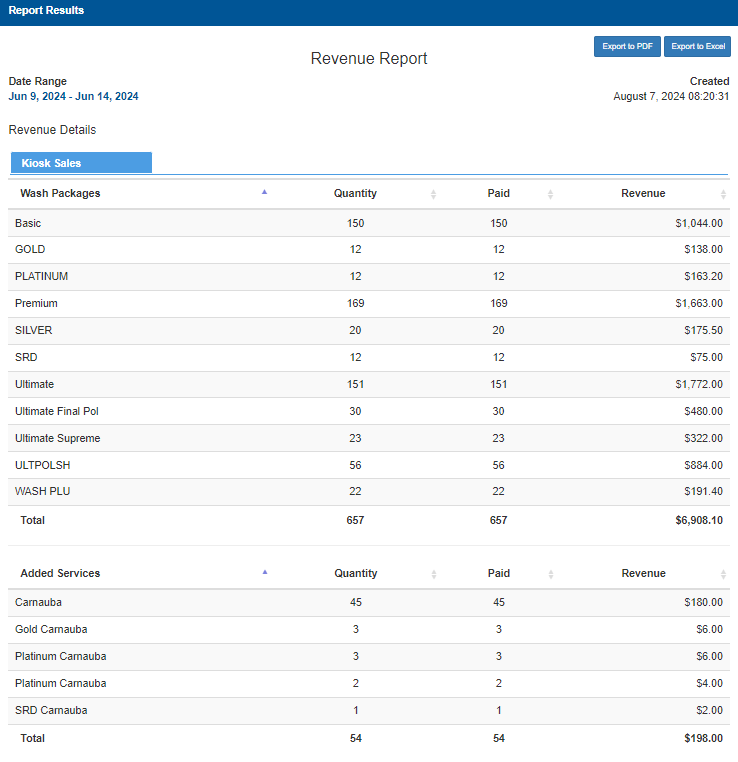
Kiosk Sales
The Kiosk Sales section provides quantity, quantity paid, and revenue sales data for wash packages and added services at the kiosk terminal(s).
Wash Packages
The Wash Packages column provides the name of each wash package sold.
Quantity
The Quantity column provides the number of each wash package recorded in a sale at the kiosk terminal(s).
Paid
The Paid column provides the number of each paid wash package recorded in a sale at the kiosk terminal(s).
Revenue
The Revenue column provides the total revenue value collected for each wash package recorded in a sale at the kiosk terminal(s).
Total (Bottom Row)
The Total row at the bottom of the table provides a total for each Wash Packages column:
- Quantity
- Paid
- Revenue
Added Services
The Added Services column provides the name of each extra service product recorded in a sale at the kiosk terminal(s).
Quantity
The Quantity column provides the number of each extra service product recorded in a sale at the kiosk terminal(s).
Paid
The Paid column provides the number of each extra service product recorded in a sale at the kiosk terminal(s).
Revenue
The Revenue column provides the total revenue value collected for each extra service product recorded in a sale at the kiosk terminal(s).
Total (Bottom Row)
The Total row at the bottom of the table provides a total for each Added Services column:
- Quantity
- Paid
- Revenue
Self Serve Products
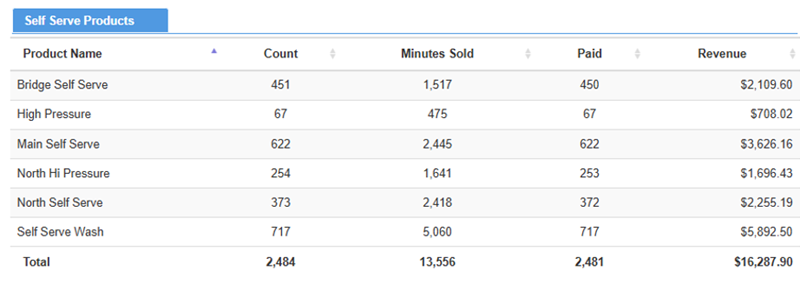
The Self Serve Products section provides sale counts, minute counts, transaction counts, and revenue for products recorded at WashPay self-serve terminals.
Product Name
The Product Name column provides the name of each self-serve product recorded in a sale at the WashPay self-serve terminal(s).
Count
The Count column provides the number of each self-serve product recorded in a sale at the WashPay self-serve terminal(s).
Minutes Sold
The Minutes Sold column provides the sum of all minutes sold for each self-serve product recorded in a sale at the WashPay self-serve terminal(s).
Paid
The Paid column provides the number of each self-serve product recorded in a sale at the WashPay self-serve terminal(s).
Revenue
The Revenue column provides the total revenue value collected for each self-serve product recorded in a sale at the WashPay self-serve terminal(s).
Total (Bottom Row)
The Total row at the bottom of the table provides a total for each Self Serve Products column:
- Count
- Minutes Sold
- Paid
- Revenue
POS Codes
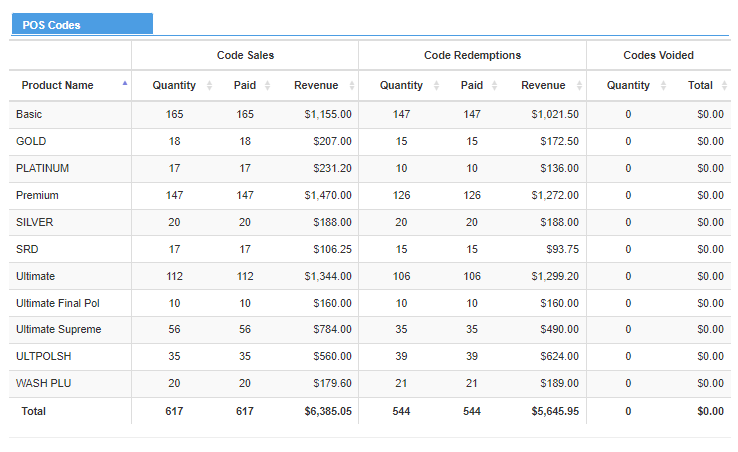
The POS Codes section provides code sales, code redemptions, and code voids sales data for point-of-sale revenue.
Product Name
The Product Name column provides the name of each wash product sold from the point-of-sale terminal.
Code Sales
The Code Sales columns provide the number of codes issued, the number of codes sold, and the total revenue, for each product, recorded in a sale from the point-of-sale terminal.
Quantity
The Quantity column provides the number of codes, for each product, recorded in a sale from the point-of-sale terminal.
Paid
The Paid column provides the number of codes, for each product, recorded in a sale that a customer paid for (not issued as single-use free wash codes) from the point-of-sale terminal.
Revenue
The Revenue column provides the total revenue recorded, for each product, from the point-of-sale terminal.
Code Redemptions
The Code Redemptions columns provide the number of codes redeemed, the number of paid codes redeemed, and the total revenue of paid codes redeemed, for each product, recorded in a sale from the point-of-sale terminal.
Quantity
The Quantity column provides the number of redeemed codes, for each product, from the point-of-sale terminal.
Paid
The Paid column provides the number of redeemed codes, for each product, recorded in a sale that a customer paid for (not issued as single-use free wash codes) from the point-of-sale terminal.
Revenue
The Revenue column provides the total revenue recorded, for each product, from the point-of-sale terminal.
Codes Voided
The Codes Voided columns provide the number of codes voided and total dollar amount of voided codes, recorded in a sale from the point-of-sale terminal.
Quantity
The Quantity column provides the number of codes voided, for each product, from the point-of-sale terminal.
Total
The Total column provides the dollar amount of codes voided, for each product, from the point-of-sale terminal.
Total (Bottom Row)
The Total row at the bottom of the POS Codes section provides totals for each column: number of codes sold, number of paid codes sold, revenue of codes sold, number of codes redeemed, number of paid codes redeemed, revenue of codes redeemed, number of codes voided, and value of codes voided.
Accounts
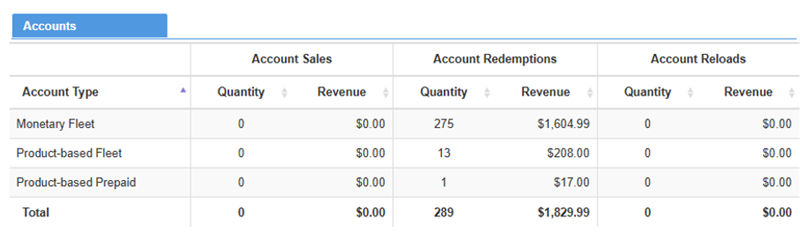
The Accounts section provides account sales revenue, account redemptions revenue, and account reloads revenue data for each account type.
Account Type
The Account Type column provides the name of each wash product sold from the point-of-sale terminal.
Account Sales
The Account Sales columns provide sales quantity and revenue amount data for each account type.
Quantity
The Quantity column provides the number of sales recorded for each account type.
Revenue
The Revenue column provides the revenue amount recorded for each account type.
Account Redemptions
The Account Redemptions columns provide redemption quantity and revenue amount data for each account type.
Quantity
The Quantity column provides the number of redemptions in sales recorded for each account type.
Revenue
The Revenue column provides the revenue amount from redemptions recorded for each account type.
Account Reloads
The Account Reloads columns provide account reload quantity and revenue amount data for each account type.
Quantity
The Quantity column provides the number of account reloads recorded for each account type.
Revenue
The Revenue column provides the revenue amount from account reloads recorded for each account type.
Total (Bottom Row)
The Total row at the bottom of the Accounts section provides totals for each column: number of account sales, revenue from account sales, number of account redemptions, revenue from account redemptions, number of account reloads, and revenue from account reloads.
Gift Cards
The Gift Cards section provides gift card sales, gift card redemptions, and gift card reload data for each gift card product that is sold, redeemed, or reloaded during the time range for which the report is generated.
Note: No Data Available is displayed in this section if no gift cards were sold, redeemed, or reloaded during the time range.

Account Type
The Account Type column provides the name of each gift card product sold, redeemed, or reloaded, during the time range for which the report is generated.
Account Sales
The Account Sales columns provide sales quantity and revenue amount data for each gift card product.
Quantity
The Quantity column provides the number of each gift card sold.
Revenue
The Revenue column provides the total revenue received for each gift card sold.
Account Redemptions
The Account Redemptions columns provide redemption quantity and revenue amount data for each gift card product redeemed.
Quantity
The Quantity column provides the number of each gift card product that was redeemed.
Revenue
The Revenue column provides the revenue amount from redemptions recorded for each gift card.
Account Reloads
The Account Reloads columns provide reload quantity and revenue amount data for each gift card product.
Quantity
The Quantity column provides the number of reloads recorded for each gift card product.
Revenue
The Revenue column provides the revenue amount from reloads recorded for each gift card product.
Total (Bottom Row
The Total row at the bottom of the Accounts section provides totals for each column: total number of gift card sales, total revenue from gift card sales, total number of gift card redemptions, total revenue from gift card redemptions, total number of gift card reloads, and total revenue from gift card reloads.
Tax
The Taxes section identifies whether, and how much, any tax was collected from sales, for the generated report's time range.

Updated: 042726