Promotion Manager (Marketing)
The Promotions panel provides the ability to create promotions (for example, discounts) for washes and extra services, and then schedule the promotions (including start and end dates, start and end times, and days of the week). After a promotion is created, it must be scheduled to be deployed using the Scheduled Tasks tool (Promotion Update).
Overlapping Promotions: When multiple promotions overlap for the same item and time window, the system resolves conflicts according to site-specific rules (for example, highest discount, precedence order, or manual configuration); consult your site policy for exact behavior.
Important: Percentage discounts, often preferred by multi-site organizations with different prices for washes, require SierraX 1.79.15.91 or newer. Fixed value discounts are available regardless of version.
See also: Create a Promotion
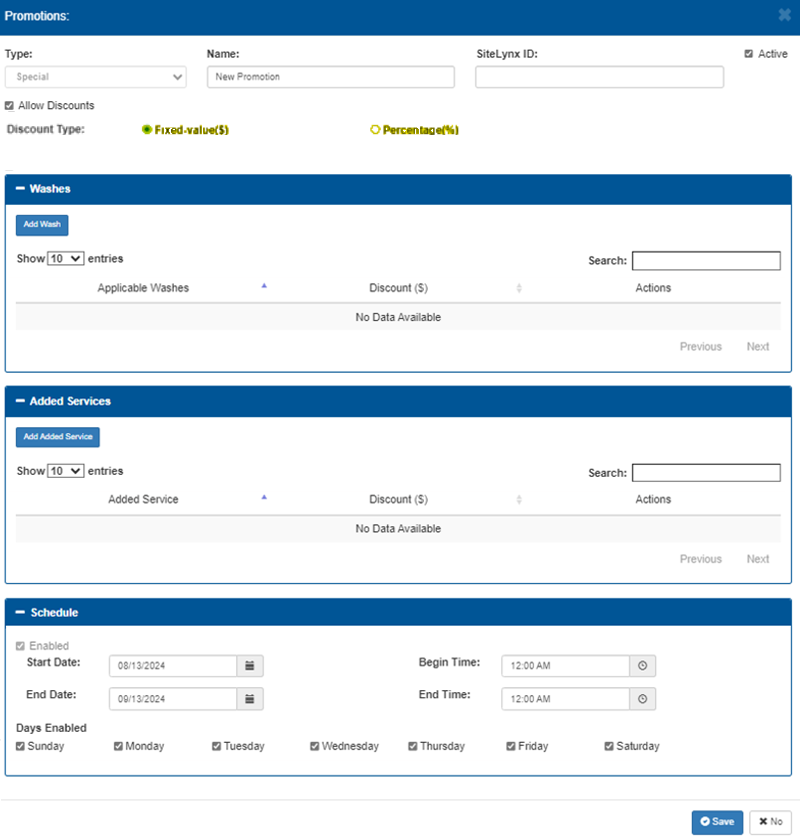
Basic Settings
The basic settings available for a promotion include its type, name, enablement, and discount applicability.
Type
The Type parameter provides the ability to specify the promotion's category (for example, "Special", "Seasonal", "Member"), to group or classify promotions for reporting.
Name
The Name parameter provides the ability to specify an identifier for the promotion, such as a descriptive name, so it is quickly identifiable to operators and on reports.
This setting is required.
Active
The Active setting controls whether the promotion is enabled or disabled. If not selected, the promotion will not be applied even if its schedule indicates it should otherwise be available.
Allow Discounts
The Allow Discounts setting controls whether the promotion applies discounts. If selected, at least one applicable wash or service should be selected and each selected item must have a discount value appropriate to the chosen Discount Type.
Discount Type
The Discount Type setting provides the ability to configure the discount as a fixed (whole) dollar amount or percentage.
Fixed-value($)
The Fixed-value($) setting provides the ability to configure the discount as a fixed currency amount to subtract from the item price.
Important: This option is available on all SierraX versions.
Percentage(%)
The Percentage(%) setting provides the ability to configure the discount as a percentage of the item price to subtract from the item price. This discount type scales with site-specific pricing, so multi-site organizations that have different prices across their sites may prefer it over fixed value discounts.
Important: This option requires SierraX version 1.79.15.91 or newer.
Washes
The Washes section provides the ability to add and configure a wash, or washes, to the promotion.
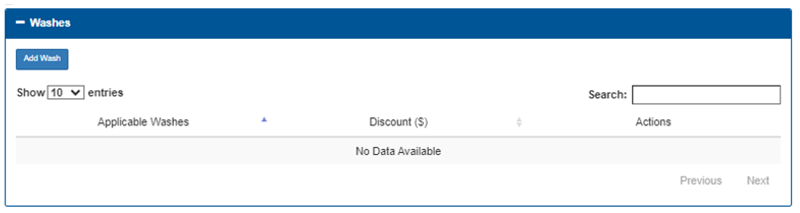
Add Wash
The Add Wash function provides the ability to add and configure a wash to be included with this promotion.
Show 10 entries
The Show 10 entries function provides the ability to specify the number of washes to list per page. If the number of washes exceeds this number, page navigation functions are enabled to advance through the additional pages.
Search
The Search function provides the ability to locate a wash, or washes, in the list.
Applicable Washes
The Applicable Washes column provides the name of each wash that is configured for this promotion.
Discount ($)
The Discount ($) column provides the value of the discount configured for the wash configured for this promotion.
Actions
The Actions column provides functions to edit or remove the corresponding wash that is configured for this promotion.
Page Navigation
Page navigation functions are enabled at the bottom of the section if the number of washes exceeds the configured maximum number. The functions are visible, but disabled if the number of washes does not exceed the maximum number.
Previous
The Previous function advances the washes list to the prior page. It is disabled when the first page is open.
Next
The Next function advances the washes list to the following page. It is disabled if no additional page is available.
Added Services
The Added Services section provides the ability to, optionally, provide an added service, or services, to the promotion.
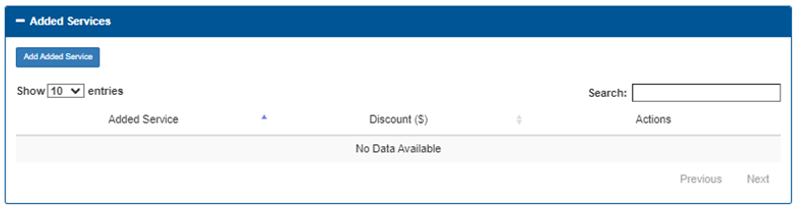
Add Added Service
The Add Added Service function provides the ability to add and configure a service to be included with this promotion.
Show 10 entries
The Show 10 entries function provides the ability to specify the number of added services to list per page. If the number of added services exceeds this number, page navigation functions are enabled to advance through the additional pages.
Search
The Search function provides the ability to locate an added service, or services, in the list.
Added Service
The Added Service column provides the name of each service that is configured for this promotion.
Discount ($)
The Discount ($) column provides the value of the discount configured for the service configured for this promotion.
Actions
The Actions column provides functions to edit or remove the corresponding service that is configured for this promotion.
Page Navigation
Page navigation functions are enabled at the bottom of the section if the number of added services exceeds the configured maximum number. The functions are visible, but disabled if the number of added services does not exceed the maximum number.
Previous
The Previous function advances the added services list to the prior page. It is disabled when the first page is open.
Next
The Next function advances the added services list to the following page. It is disabled if no additional page is available.
Schedule
The Schedule section provides the ability to set a date and time range, as well as day(s) of the week, that the promotion is enabled and active.
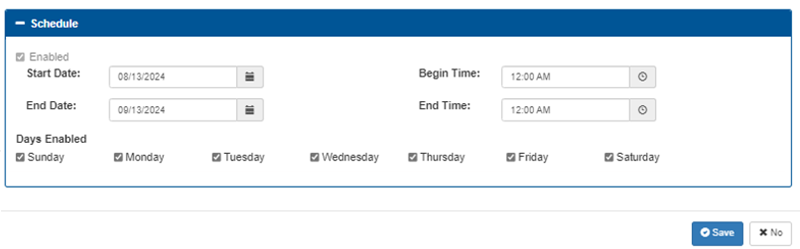
Enabled
Checkbox that turns scheduling on or off for the promotion; when scheduling is enabled the promotion is governed by the date, time, and day-of-week controls, and when disabled the promotion will not automatically activate by schedule.
Date Range
When scheduling is enabled, both Start Date and End Date are required and End Date must not be earlier than Start Date; the system enforces this validation.
Start Date
Date picker field that sets the first calendar date on which the promotion may take effect; the promotion will not apply before this date.
End Date
Date picker field that sets the last calendar date on which the promotion may take effect; the end date is validated against the start date and the promotion will not apply after this date.
Time Range
Begin Time and End Time are required when a time window is used; rules for equal times, midnight boundaries, and overnight spans vary by site configuration and should be confirmed with administrators.
Begin Time
Time picker field that sets the time of day the promotion becomes active each applicable day; behavior for equal begin and end times or edge-case midnight values should be confirmed with site rules.
End Time
Time picker field that sets the time of day the promotion stops being active each applicable day; if the end time is earlier than the begin time this may create an overnight interval—confirm how overnight spans are handled.
Days Enabled
Set of weekday toggle controls (one per day, Sunday through Saturday) that determine on which days of the week the promotion will be active within the configured date and time ranges.
Save | No
The Promotion Manager panel provides a Save function to save a new/edited promotion, and a No function to cancel the addition of a new promotion or changes to an existing promotion.
Updated: 042726