Account Manager (Accounts)
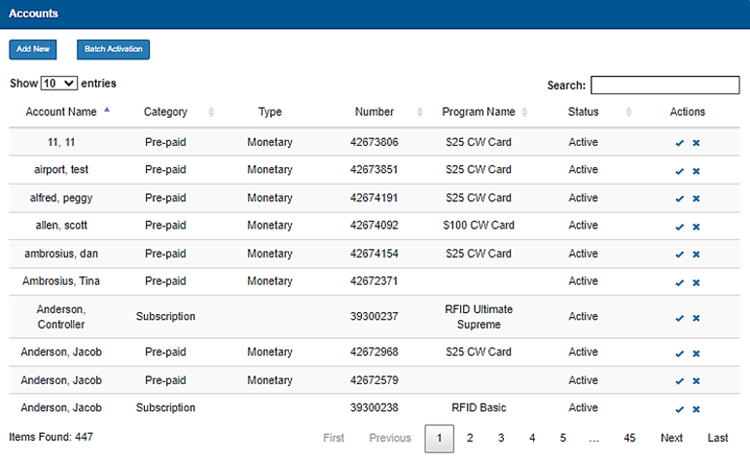
The Accounts panel provides the ability to view, add, edit, and delete users and accounts. An account program template must first be added in the Account Program panel before an account can be added.
Warning: Deleting an account or user also deletes its corresponding historical data, which can't be recovered or restored. Sites should set an account or user's Status to Inactive, rather than delete it.
See also: Create an Account Program Template and Edit an Existing Account
Add New
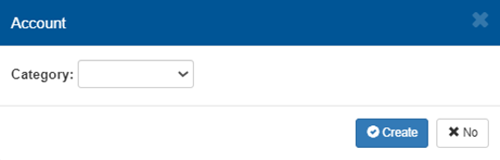
The Add New function provides the ability to add a new account. It opens a dialog to specify the new account's Category, for example Prep-paid.
Batch Activation
The Batch Activation function provides the ability to activate multiple accounts together, rather than one at a time.
Accounts List
The accounts list provides information about existing accounts, including name, category, type, number, program name, and status.
Show 10 entries
The Show 10 entries function provides the ability to specify the number of accounts to list per page. If the number of accounts exceeds this number, page navigation functions are enabled to advance through the additional pages.
Search
The Search function provides the ability to locate an account, or accounts, in the list.
Account Name
The Account Name column provides the name associated with the account, for example, John Smith.
Category
The Category column provides group of the account, for example, Pre-paid.
Type
The Type column provides the value format of the account, for example, Monetary.
Number
The Number column provides the unique identifier assigned to the account.
Program Name
The Program Name column provides the product name to which the account belongs, for example, $25 Gift Card.
Status
The Status column provides the current state of the account, for example, Active.
Actions
The Actions column provides functions to edit (check mark icon) or delete (x icon) the account.
Warning: Deleting an account or user also deletes its corresponding historical data, which can't be recovered or restored. Sites should set an account or user's Status to Inactive, rather than delete it.
Items Found
The Items Found component provides the number of accounts in the accounts list. By default, it reports the total number of accounts. If the search tool is used, it updates to report the number of accounts in the search results.
Page Navigation
Page navigation functions are enabled at the bottom of the panel if the number of accounts exceeds the configured maximum number. The functions are visible, but disabled if the number of accounts does not exceed the maximum number.
First
The First function advances the accounts list to page 1.
Previous
The Previous function advances the accounts list to the prior page. It is disabled when the first page is open.
Page Number
The Page Number function advances the accounts list to the specific, user-entered page.
Next
The Next function advances the accounts list to the following page. It is disabled if no additional page is available.
Last
The Last function advances the accounts list to the final page.
Updated: 042726