Create Single-Use Codes
Use the steps below to generate 1 to 1,000 single-use codes with the DirectorX Code Generator. Single-use codes can be configured to redeem a wash or provide a discount.
Note: See "Send Single-Use Codes" for steps to activate (either export to Excel or send via text or email message) the generated codes.
Tools Required
- Generating single-use codes requires the DirectorX Code Generator permission/access.
Steps
Use the steps in this section to generate a batch of single-use codes, for either a free wash or a discount on a specific wash product. Note that after the codes are generated, they must still be activated before they can be used or redeemed. Activation steps are provided in "Send Single-Use Codes".
Open the Code Generator
Use the steps in this section to open the Code Generator in DirectorX.
- Log In to directorX.
- Select Marketing. The Marketing panel opens.
- Select Generate Codes. The Code Generator panel opens.
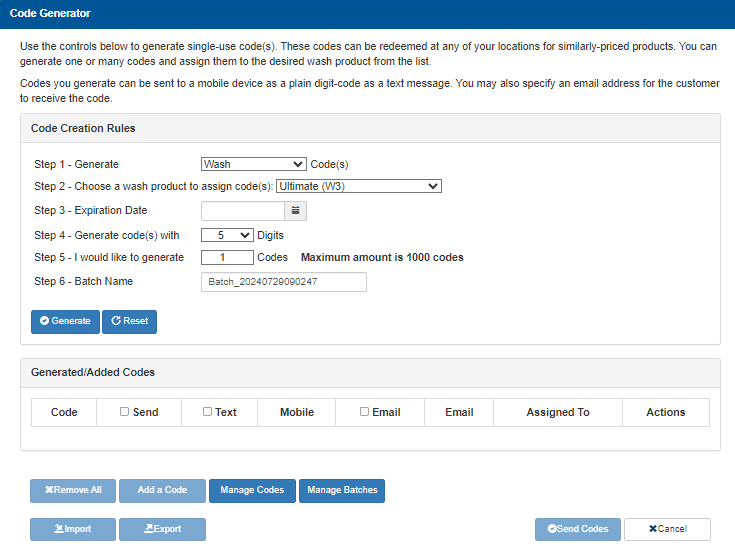
Generate a Wash or Discount Code Batch
Determine whether the single-use codes will provide a free wash, or a discount off a wash product, and then use the corresponding steps in this section.
Important: Be sure to select a wash that is available at the site where the codes will be redeemed.
Wash Code
Use the following steps to generate single-use codes that can be used to redeem a wash (free).
- Navigate to the Code Creation Rules section.
- In Step 1 - Generate, select Wash for the code type.
- In Step 2 - Choose a wash product to assign code(s), select specific wash type to which the codes apply.
- In Step 3 - Expiration Date, select the date the codes are no longer valid. Note: The date prior to this date is the last date the code can be used.
- In Step 4 - Generate code(s) with _ Digits, enter the number of digits that comprise each single-use code. Important: Use 7-digit codes to avoid issues with the site's fuel or point-of-sale system's codes.
- In Step 5 - I would like to generate _ Codes, enter the number of single-use codes to generate for this code batch. Note: The maximum number of codes that can be generated for a batch is 1,000.
- In Step 6 - Batch Name, enter a name.
- Select Generate. The single-use code batch is generated and added to the Generated/Added Codes section.

Discount Code
Use the following steps to generate single-use codes that can be used to provide a discount (dollar value) off a wash or wash service.
- Navigate to the Code Creation Rules section.
- In Step 1 - Generate, select Discount for the code type.
- In Step 2 - Choose a wash product to assign code(s), select specific wash type to which the codes apply.
- In Step 3 - Expiration Date, select the date the codes are no longer valid. Note: The date prior to this date is the last date the code can be used.
- In Step 4 - Generate code(s) with _ Digits, enter the number of digits that comprise each single-use code. Important: Use 7-digit codes to avoid issues with the site's fuel or point-of-sale system's codes.
- In Step 5 - I would like to generate _ Codes, enter the number of single-use codes to generate for this code batch. Note: The maximum number of codes that can be generated for a batch is 1,000.
- In Step 6 - Batch Name, enter a name.
- Select Generate. The single-use code batch is generated and added to the Generated/Added Codes section.
Activate the Codes
The generated codes can't be redeemed at a site until they're activated. Codes are activated by either exporting them to Excel, or sending them via email or text message.
- See "Send Single-Use Codes" for steps to activate the generated codes.
Updated: 042726