Send Single-Use Codes
Use the steps below to activate a batch of single-use codes (which can contain 1-1,000 single-use wash or discount codes) with the directorX Code Generator. Codes must be activated, by either sending them via email or SMS text message, or exporting them to an Excel file, before they can be redeemed/used at a site.
Note: See Create Single-Use Codes for steps to generate single-use codes.
Tools Required
- Generated code batch for single-use wash codes or single-use discount codes.
Steps
Use the steps in this section to send (activate) a code batch. A code batch can be activated three different ways - sent via SMS text message, sent via email message, or exported to an Excel file. Steps for all three are provided.
Select Code Batch
- Log In to directorX.
- Select Marketing. The Marketing panel opens.
- Select Generate Codes. The Code Generator panel opens.
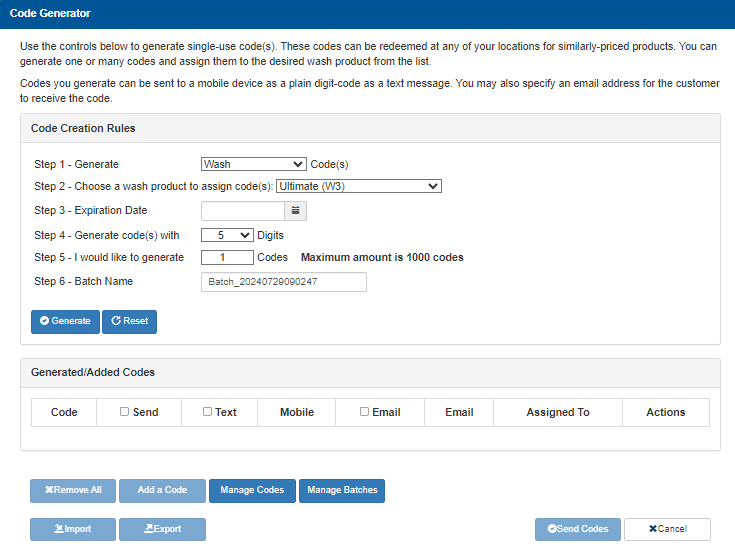
- Navigate to the Generated/Added Codes section.

- Locate the code batch to send.
- Select Send.
Send via SMS Text
Use the following steps to send the codes via SMS text message. See the section below to send them via email message.
- Select Text for the code batch.
- Under Mobile, select Add.
- Enter the recipient's mobile phone number.
- Select Send Codes.
Send via Email
Use the following steps to send the codes via email message. See the section above to send them via SMS text message.
- Select Email for the code batch.
- Under Email, select Add.
- Enter the recipient's email address.
- Select Send Codes.
Export to Excel
Use the following steps to activate the codes by exporting them to an Excel file.
- Locate the functions below the Generated/Added Codes section.
- Select Export.
Updated: 042726